Explore UAB

Learning & Development

Looking for a time-saving shortcut when working with text in Excel? Discover a time saving trick for centering data in a flash.


Do you have a label or other text in your Excel sheet that you need to center across multiple cells? The most common method is typically to merge the cells together. However, it is possible to center data without merging those cells.


How to center data without merging cells

  1. Open the Excel workbook and navigate to the worksheet.
  2. Select the cells where you want to center the text.
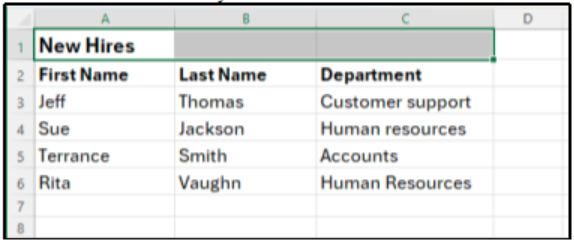
  3. Press Ctrl + 1 (Windows) or Cmd + 1 (Mac) to open the Format Cells dialog box.
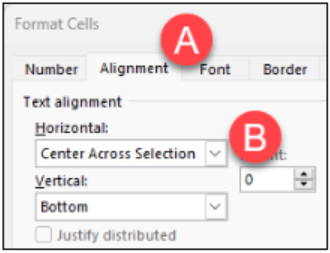
  4. Click the Alignment tab. Under Horizontal, click the drop-down menu and select Center Across Selection, then click OK.

Resources to Learn More


Written by Alison Kniseley, L&D Specialist

References: Richard, Cowboy Accounting, 2025

  • Close-up of man in suit holding a graphic of a brain with AI written on it
    Productivity Prompts You Can Use Today in Copilot Chat 2026-01-14

    Try these copy‑and‑paste prompts for Copilot Chat to help you write faster, prioritize work, create executive updates, and make quick data decisions. Each prompt includes clear input instructions and output formatting—plus notes where Microsoft 365...

  • Man sits in front of a desktop computer which displays a spreadsheet
    Tip for Centering Data in Excel 2026-01-14

    Looking for a time-saving shortcut when working with text in Excel? Discover a time saving trick for centering data in a flash. Do you have a label or other text in your Excel sheet that you need to center across multiple cells? The most common...