



Looking for a time-saving shortcut when working with text in Excel? Discover a time saving trick for centering data in a flash.
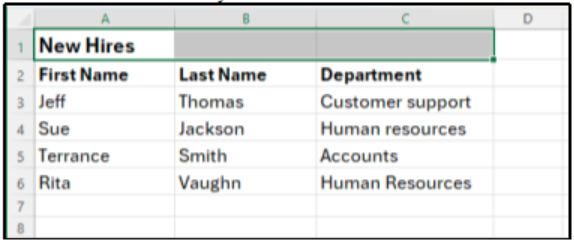
Do you have a label or other text in your Excel sheet that you need to center across multiple cells? The most common method is typically to merge the cells together. However, it is possible to center data without merging those cells.
How to center data without merging cells
- Open the Excel workbook and navigate to the worksheet.
- Select the cells where you want to center the text.
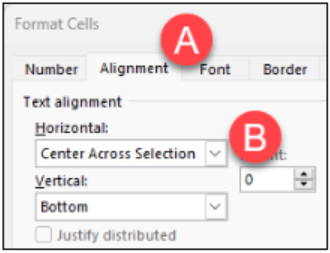
- Press Ctrl + 1 (Windows) or Cmd + 1 (Mac) to open the Format Cells dialog box.
- Click the Alignment tab. Under Horizontal, click the drop-down menu and select Center Across Selection, then click OK.
Resources to Learn More
Written by Alison Kniseley, L&D Specialist
References: Richard, Cowboy Accounting, 2025

Discover how a simple principle can help you prioritize the projects that deliver the biggest impact. Learn to apply the Pareto Principle to make smarter, more strategic decisions this year.
What Projects Should We Work on This Year?
Every year brings a flood of ideas, initiatives, and opportunities. The challenge isn’t finding projects…it’s choosing the right ones. How do you decide where to invest your team’s time and energy for maximum impact?
Start by asking yourself:
- Which projects will create the most value for our stakeholders?
- What activities have historically driven the greatest results?
- If we could only accomplish three things this year, what would they be?
These questions set the stage for a powerful tool: the Pareto Principle, also known as the 80/20 Rule. This principle suggests that roughly 80 percent of results come from 20 percent of efforts. It was first introduced by Italian economist Vilfredo Pareto in his 1897 work Cours d’économie politique and later popularized in quality management by Joseph Juran (Interaction Design Foundation).
How to Apply the 80/20 Rule to Your Planning
- List Your Options: Write down all potential projects or initiatives for the year.
- Analyze Impact: Ask, “Which of these will deliver the greatest outcomes if successful?”
- Identify the Vital Few: Highlight the top 20 percent of projects that will likely produce 80 percent of the results.
- Focus Resources: Allocate time, budget, and talent to these high-impact priorities.
This approach doesn’t mean ignoring everything else — it means being intentional. By concentrating on the “vital few,” you avoid spreading your team too thin and ensure meaningful progress.
Why It Works
The Pareto Principle forces clarity. Instead of chasing every good idea, you double down on the best ones. Whether you’re planning academic programs, research initiatives, or operational improvements, this method helps you cut through the noise and focus on what truly matters.
Resources to Learn More
- LinkedIn Learning: Use the 80/20 rule for maximum impact
- External Article: The Pareto Principle and How to Be More Effective
Written by Jerad Watson, L&D Manager
HR Updates
-
Deadline to file annual ethics report is April 30
As a public institution, UAB employees who meet certain criteria are required by the state of Alabama to complete an annual Statement of Economic Interests Form. As required by law, the UAB Human Resources provides the Alabama Ethics Commission...
-
Deadline approaching for UAB’s Premium Assistance Program
The Premium Assistance Program is designed to ease the cost of medical premiums for benefits-eligible employees whose total combined household income, based on family size, is at or below twice the federal poverty level (see 2026 Premium Assistance Income...
-
HRIS launches Empower U to provide employees real-time support for administrative systems
The HR Information Systems (HRIS) team is launching HRIS Empower U, a new weekly Zoom session designed to give employees real‑time help with administrative systems — no ticket submission required. Each Wednesday from 10-11 a.m., participants can...
-
Reminder: Employees can review job title, pay grades and pay rates anytime in Oracle
Employees can use Self-Service Applications in the Oracle HR and Finance Administrative System at any time to review and verify current job titles, pay grades and pay rates. Self-service stations are available in the UAB Administration Building...